


CSi RBMware Platinum. CSi launched its new maintenance strategy over 10 years ago: Reliability-Based Maintenance® (RBMTM = Reliability-Based Maintenance.) The basis of this is the CSi MasterTrend software, which has been successfully used worldwide by numerous users for data collection and analysis related to condition-based machine maintenance. The CSi RBMware Platinum software package includes and expands the procedures implemented in the MasterTrend software, achieves an even higher level of integrating various condition monitoring and maintenance technologies into a comprehensive evaluation-organizing system, and expands the possibilities of information transfer to the company's technical and economic top management, as well as maintenance organization, operational, enterprise management, and enterprise information software systems.
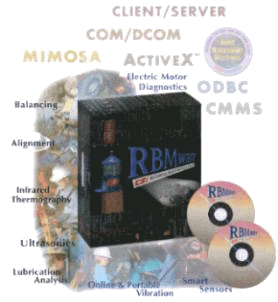
Content of the CSi RBMware Platinum software package:
and:
The RBMviewTM software is a high-level tool for organizing business and maintenance activities. With its application, all monitored equipment can be viewed on a single screen, allowing a detailed inspection of each piece of equipment. CSi RBMware Platinum offers a control menu that provides insight into live maintenance activities and operational processes from both maintenance planning and business management perspectives. RBMview - recognizes, organizes, and logs equipment conditions from the very first problem to service requests, repair-maintenance work orders, all the way to cost analysis.
Support for various machine condition monitoring technologies CSi RBMware Platinum provides the most powerful toolset today for the immediate application of various machine condition monitoring technologies. These tools are developed to easily organize data for quick and accurate diagnosis of various problems. RBMware integrates data from all machine condition monitoring technologies - whether it's vibration diagnostics, oil analysis, electric motor analysis, thermography, ultrasonic analysis, laser shaft alignment, or dynamic balancing - with complete documentation and comprehensive data utilization.
Build your database in minutes with RBMwizard
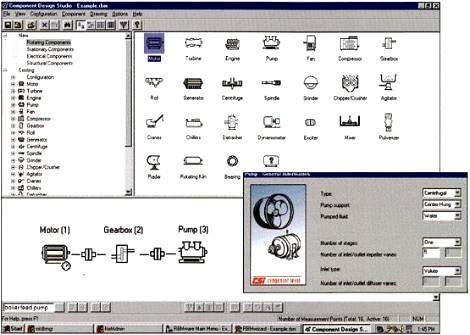
In the past, creating and building a database was a time-consuming task. Each database template contained only a partial solution. Now, the situation is different: RBMware includes an interactive database builder - RBMwizardTM - which, with user guidance, easily and accurately performs the database construction. RBMwizard guides the user step by step through the phases of building the database. For creating machines, complete machine groups, or equipment chains, it offers simple drag-and-drop graphical elements. Components can be defined from the large libraries of RBMwizard, which contain numerous motors, bearings, drives, belts, and other elements. For each element, RBMwizard immediately offers predefined settings for further configuration data input, then automatically generates suggested measurement points, analysis parameter sets, alarm values and fault frequencies, suggests PeakVue® and SSTTM technologies for the points to be measured, and prepares Nspectr® configuration files as well. Whether a novice or experienced analyst: with the RBMwizard program module, you can build your database, collect measurement data, and start analyzing equipment problems in just one day!!!
Problem tracking from recognition to repair with the "Overview at a Glance" feature The RBMview "Overview at a Glance" program module provides a structured tree-like overview of all equipment. The color of the icons in the tree structure provides immediate information about the current status of the represented equipment: prediction, alarm, serious fault can be recognized. By clicking on the appropriate icon, the item expands, revealing further - more detailed - information. The analysis tools of CSi RBMware Platinum can now be launched for detailed diagnostics.
Efficient workflows with VibView
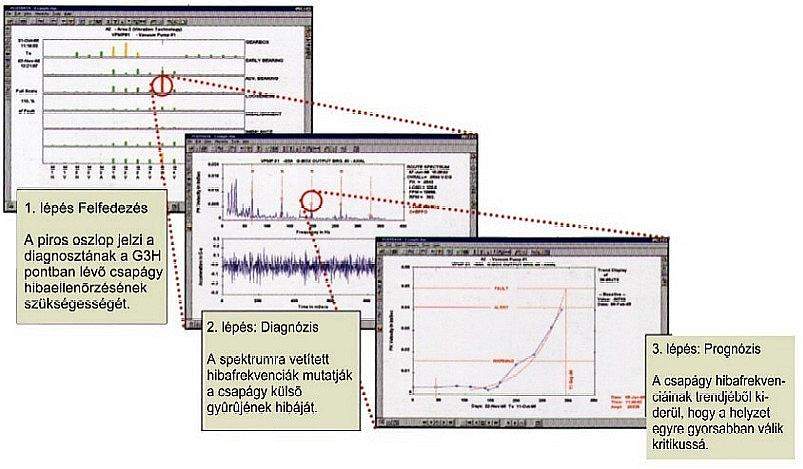
The status overview diagram provided by VibView - which indicates vibration levels at multiple predefined frequency bands on a single screen - can provide an overview of one (or multiple) equipment group (first step). The height of the columns represents the vibration value, while the color indicates exceeding threshold values. Based on this, critical locations can be found within seconds, and by clicking on them, the appropriate vibration spectra and attached fault frequencies can be immediately retrieved for identifying the nature of the fault (second step). Moving into trend plotting, the rate of deterioration acceleration can be examined (third step), and based on this, the timing of necessary interventions can be planned. With the RBMview program modules, you can now store and document the analysis results for the management, and make your recommendations (and you're all set!).
VibView - the most comprehensive vibration diagnostic software package for industrial applications
VibView combines data from various vibration monitoring systems, including data from installed systems, portable data collectors and machinery analyzers, as well as data from wireless SmartSensor technology sensors. All this is organized in a single database! It includes a central control panel for managing all analysis tools, making everything needed during diagnostic and documentation work easily accessible. With the click of a button, you can jump from spectrum to time waveform and further to trend. By clicking again, you can select the next machine and immediately view its measurement points...
Comprehensive reporting tools for efficient documentation of results
The RBMview software incorporates high-performance graphic and reporting tools. These logging and graphical capabilities allow displaying analysis results of all kinds of machinery condition monitoring technologies for all equipment in the system. Additional reports can document cost savings, problem frequencies, and any other information recorded in the maintenance organization process.
PlotData - first-class visualization tools
With PlotData, you have first-class visualization tools at your disposal to quickly display spectra, time waveforms, and trends. The diagnostic display tools allow for showing defined alarm levels, fault levels, fault frequencies, harmonic and sideband cursors, as well as representing trended data from various condition monitoring technologies.
AutoStat - user-specific settings based on statistical evaluations
The RBMwizard program, with its interactive database-building tools, excels in quickly creating the user's database with recommended initial alarm levels. Subsequently, using the AutoStat program module automatically adjusts the settings to the actual operating conditions, thus preventing both false alarms due to excessively low threshold values and missing alerts due to overly defined levels.
Fast and accurate fault frequency calculation
The VibView program module performs automatic fault frequency calculations for various machine components, such as bearings, belt drives, and gear transmissions. The predefined component database includes over 30,000 bearings, hundreds of electric motors, gears, and drives, eliminating the need for manual searching and calculation.
Analysis of variable speed machines with automatic speed correction
The VibView software module has unique capabilities in handling variable operating speeds. The software can detect changes in machine speeds and compensate the measurement results accordingly.
ODS - motion modeling of machine structures (supplementary software module)
CSi RBMware Platinum directly exports data to an associated ODS software module. Create machine models and animate vibration data for spectacular documentation of machine faults! Conduct deeper structural analysis with the Modal Analysis software and examine virtual modifications of machine structures to identify problems causing unreliability. The results can be forwarded as digitized videos via email.
VibPro - for advanced vibration analysis (supplementary software module)
The RBMware (optional) VibPro program module serves for deeper analysis of data collected in transient and cross-correlation modes with the CSi2120 handheld instrument. Its capabilities include computing and displaying phase cross-correlation, coherence, and transfer function. By retrospectively evaluating transient data (time signals) recorded during machine operation, the frequency characteristics of vibrations (spectra) can also be displayed.
Nspectr® - expert system for automatic fault analysis
The Nspectr program automatically displays data and assists in diagnosing machine problems. It excels in the comprehensive analysis of multi-component machine structures and assessing the nature and severity of problems, making it an essential tool for both novice and experienced vibration diagnosticians.
UltraMgr - integration of shaft alignment and balancing into PC-based maintenance management
The UltraMgr® software suite includes modules for shaft alignment, vibration analysis, balancing, electric motor analysis, and machine qualification. These cover a wide range of applications and allow for integrating machine alignment tasks into maintenance management.
OilView - maintenance information from oil analysis data (supplementary software module)
The RBMware OilView® program modules support on-site, laboratory, and wear debris-based oil analysis and are capable of analyzing, displaying, trending, and documenting oil analysis data for maintenance management purposes. An automatic advisory module is available. The patented TrivektorSM of OilView categorizes and compresses various oil quality data into a single, visually appealing chart consisting of three vectors: chemistry, contamination, wear. The alarm levels for each vector can be set based on the machine type and operating conditions.
SonicView - integration of ultrasonic inspections into maintenance management software (supplementary software module)
The SonicView software, the RBMware ultrasonic inspection program module, which fully integrates the ultrasonic inspection data into the database containing data from other condition monitoring technologies. SonicView is a high-performance but easy-to-use software that offers tools for checking steam traps, compressed air systems, valves, and lubrications and for evaluating the data. Its functions:
Application-specific cost analysis, condition reporting, and basic reports are prepared for printing. In addition, special - error predictive - analyses can also be performed.
InfraAnalysis - maintenance scheduling software for thermographic analyses (additional software module)
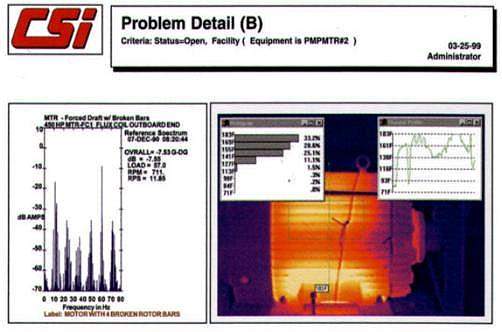
For successful and efficient thermographic inspection procedures, not only a thermal camera is needed: a suitable organizing program is required to plan the inspection process in advance, organize the inspection data, and precisely evaluate and document it. The InfraAnalysis software establishes the foundations for this and provides tools for survey-comparative thermographic inspections, e.g.:
MotorView and MotorSTATUS for electric motor diagnostics, Smart technology for mobile protections (additional software module)
RBMware - uniquely in the industry - offers analysis and diagnostic tools for monitoring the conditions of electric motors with the CSi portable flux meter, shaft current sensor, and MotorSTATUS® Smart sensor. These tools include the MotorView® I and II, UltraMgr Motor, and MotorSTATUS SmartSensor® software modules. The MotorView I software is for analyzing the motor power supply frequency
Copyright © PIM Professzionális Ipari Méréstechnika Kft.
2026 | Minden jog fenntartva
Impresszum | Adatkezelés